The Accounts page
Finance → Accounts is where the money documents live: what customers owe you, what you owe suppliers, what's been paid, and what still has to reach your bookkeeping. Garage admins and front of house both use it.
Seven tabs: Overview, Invoices, Payments, Supplier invoices, Purchase orders, Export and Books check.
Overview
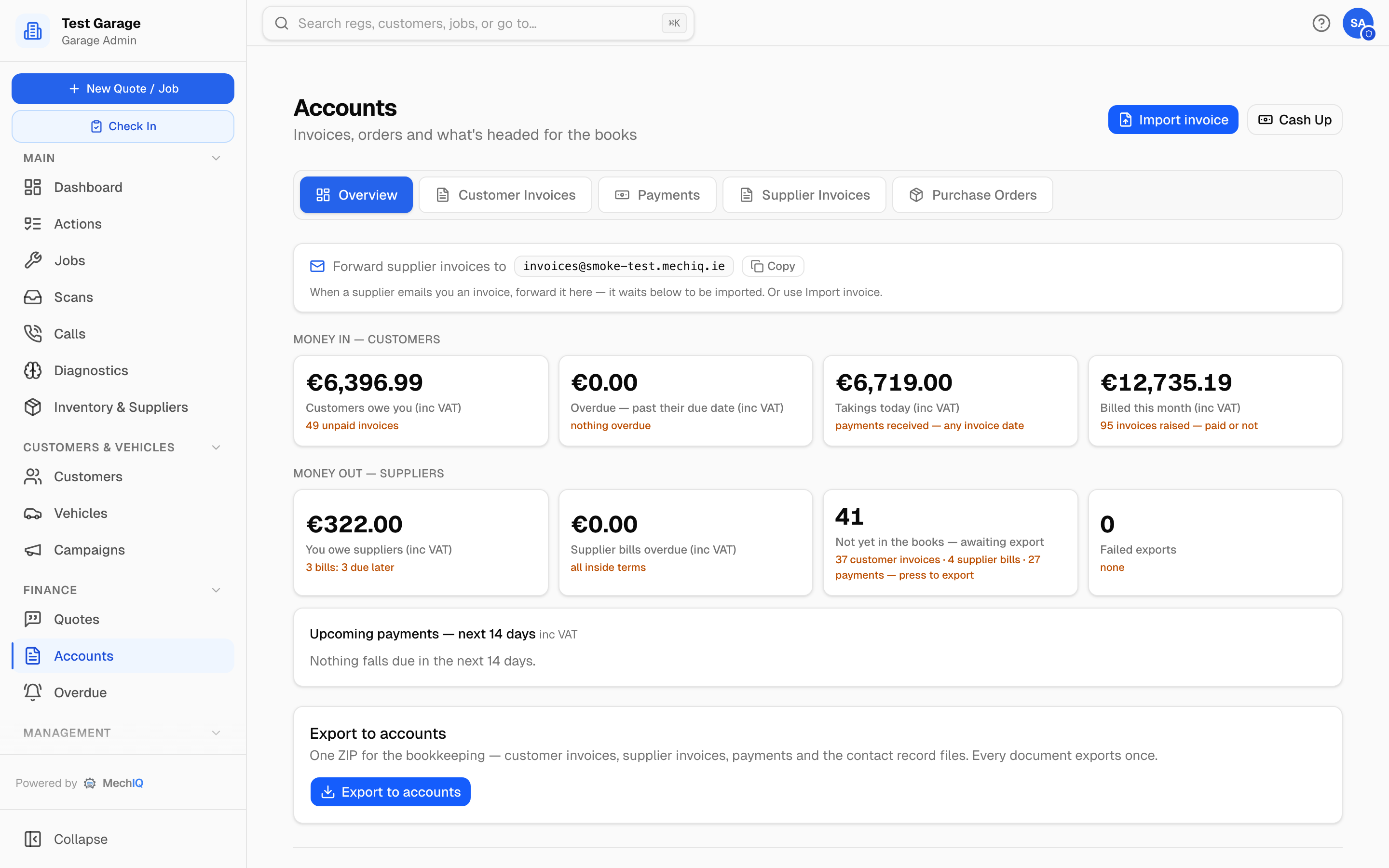
Every money tile is inc VAT and says so. Every tile opens the list behind its number with the filter already applied. A bar above the list names the filter and gives the count, which matches the tile. Show all clears it.
Money in — customers
- Customers owe you -- outstanding invoices. Opens Invoices filtered to Outstanding.
- Overdue — past their due date -- opens Invoices filtered to Overdue. The Overdue queue groups the same invoices by age.
- Takings today -- payments received today, whatever the invoice date (inc VAT, any method, less refunds paid out). Opens Payments showing today's payments and their total.
- Billed this month -- invoices raised this month, paid or not. Opens Invoices filtered to Billed this month.
Money out — suppliers
- You owe suppliers -- opens Supplier invoices showing only the unpaid bills.
- Supplier bills overdue -- opens Supplier invoices showing only the overdue bills.
- Not yet in the books — awaiting export -- documents recorded in MechIQ that your bookkeeping hasn't been told about yet. It is not money you haven't taken. Opens the Export tab with the export preview, which counts the same documents.
- Failed exports -- documents whose most recent attempt to reach a connected package failed. A successful retry drops out of the count. Opens Invoices filtered to the failed ones, ready to retry.
Upcoming payments — next 14 days lists supplier bills falling due, with the total.
Accounting setup isn't finished — N settings missing shows above Your books while a setting your route to the books needs is not set (a tax code, the cash sales reference, Match to my Sage accounts and so on). It opens the list at the top of Settings → Accounting.
Cash-up (top right) shows the day's takings by method for checking against the till and card terminal. See Cash up.
Export
The Export tab holds the month-end check, the one export, and the export history.
Each document's state with your books. Every invoice, credit note, payment and supplier invoice shows one of five states, the same on every list and on the month-end check: In your books, Not in your books yet, Didn't reach your books (the reason on hover), Needs an Accounts reference (held back: an imported customer or supplier not matched to its Sage account yet, an unset cash sales or cash purchases reference, or an account your connected package refused to create -- with its reason) and Changed after sending (correct it in your package). An invoice with no lines that carries VAT (a summary invoice brought in from an old system) reads Needs entering by hand: MechIQ holds its VAT as one figure with no VAT rate, so no tax code can carry it. It is not in any export and is not sent to a connected package. Enter it in your books by hand.
Month end. Pick a month. The check shows the month's invoices, credit notes, payments received, supplier invoices and supplier payments, with net, VAT and gross, and how many of each are in your books. It lists every document that is not, with the reason. Export
Export to accounts
The export card is the one export for everything. Choose Everything not in your books yet (the usual choice) or Dates (type a From and a To date; only the documents dated in that range that are not in your books yet go). It builds one ZIP for the bookkeeping -- customer invoices and credit notes, supplier invoices and credit notes, payments received, supplier payments (PP/PA/PD/PR), and the record files for the customers and suppliers in this export. Every document exports once. Once a document has been in a ZIP it is marked as in the books and isn't included again.
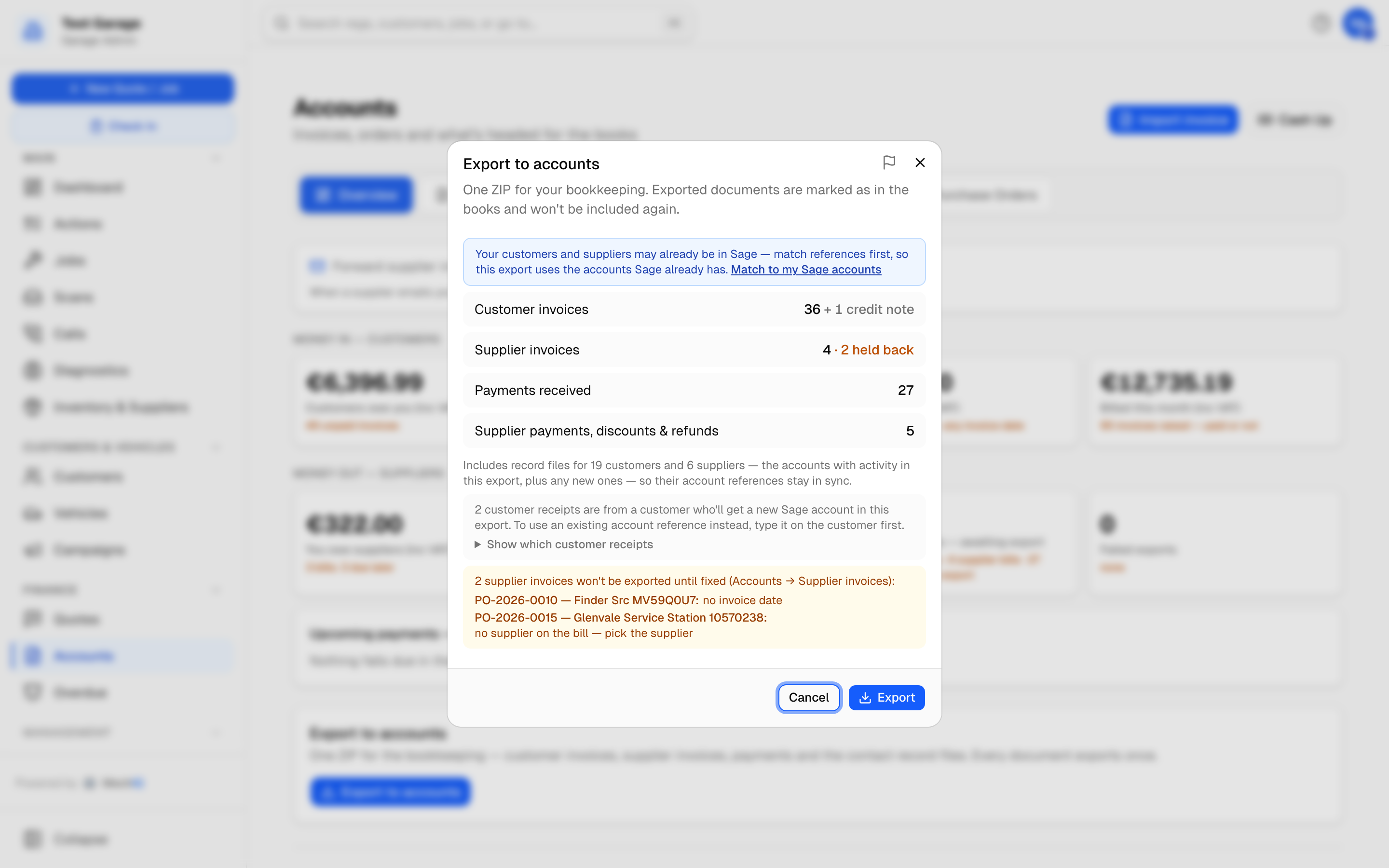
Press Export to accounts. The dialog counts what's new:
- Customer invoices (with credit notes counted beside them)
- Supplier invoices -- with any held back because they can't be exported yet. The held-back ones fold under one line (35 supplier invoices held back — show) with a short reason line; click it to see each invoice with its reasons and a link to fix it.
- Payments received
- Supplier payments, discounts & refunds -- see Paying suppliers
Customer and supplier record files keep your package's accounts in sync. They carry only the customers and suppliers with a document in this export. The dialog says how many. If there are no new documents but some records are due, the button reads Export contacts only.
Warnings appear before you export, and they mean it:
This export cannot run yet. These accounting codes are not set: ... -- a file in this export needs a nominal code or a tax code you have not set (for example the tax code for 23% VAT, the sales nominal code for Labour or the account code for cash payments). MechIQ never fills in a code for you and never exports a row without one, so the Export button is switched off until they are set. Each is named as the setup list at the top of Settings → Accounting names it; follow the link, type the codes your accountant uses, save, and export again. Nothing has been marked as exported.
N customer invoices have no account reference -- these are for walk-ins with no phone or email, which post to your Cash Sales account, and its reference isn't set. Click Show which invoices to see each invoice and customer, then Set cash sales reference (it opens Settings → Accounting). This warning only appears when the cash sales reference really is missing.
N customer receipts have no account reference -- the same, for payments: a payment from a walk-in, while the cash sales reference isn't set. Every receipt or refund posts to the same account as the invoice it pays, including invoices imported from your old system, so once the reference is set these go too.
N supplier invoices won't be exported until fixed -- listed by number with the reason and, where it's an account-reference problem, a link to fix it: Open supplier (no supplier account reference) or Set cash purchases reference (an over-the-counter supplier while the cash purchases reference isn't set). Fix them and export again; they aren't marked exported.
Accounting setup isn't finished — N settings missing -- a setting your route needs is not set yet (for a Sage garage with customers or suppliers from an old system, that includes Match to my Sage accounts). Not a block by itself: it opens the list at the top of Settings → Accounting, which names each setting, why it is needed and how many documents it holds back.
N customer invoices won't be exported yet -- the customers are already in your Sage but not matched to their Sage account -- with Match to my Sage accounts switched on, a customer or supplier brought in from your old system is held back (with their invoices, bills and payments) rather than sent under a made-up reference: all of them until that list (customers or suppliers) has been matched (except the ones that got their reference from External System No. in your old system), and afterwards only the ones you left unpicked in the review. One that simply isn't on your Sage list isn't held -- it gets a new Sage account. Click Match to my Sage accounts, then export again.
Documents for Unassigned vehicles (imported) -- the holding customer for imported cars with no known owner -- are always held back. Move each vehicle to its real customer (Move to customer on the vehicle) and they export under that customer.
A grey note (not a warning) may also appear: N customers will get a new Sage account in this export. These are customers with a phone or email who don't have an account reference yet. The export gives each one the next reference (C00412...) and sends their account in the customer records file, so nothing is rejected. If you'd rather use a reference they already have in your package, click Show which invoices, then Open customer, and type it under Accounting reference before you export.
Press Export. The ZIP downloads (mechiq-accounts-<garage>-<date>.zip) and the documents in it are marked exported. Hand it to your bookkeeper or import it yourself.
If an export went out wrong, a garage admin can Re-open it in Settings → Accounting so its documents go in the next export again.
What's in the ZIP depends on your Downloaded file format in Settings → Accounting. On the Sage Audit Trail layout there is one transactions file. On the General or Xero layout there is a sales file, a purchases file, a payments file (one row for each payment, with how it was paid) and a supplier payments file. Every layout adds a customer records file and a supplier records file. Every date in every file is DD/MM/YYYY.
The date a document has in your books is your garage's own day (your time zone), not the UTC day: an invoice raised at half past midnight in summer is dated that day. A written-off invoice goes as the sale, on the day it was raised, and its write-off credit (INV-2026-0042-WO), on the day it was written off. The export file, a connected package and the Books check all use these dates.
The ZIP always has a README.txt written for your bookkeeper: what the export covers, what each file is and how many documents are in it, how to read the columns of the General sales file, and anything that was not exported and why. Details in Accounting settings.
If you're connected to Sage, Xero or QuickBooks instead, invoices flow across as they're raised or paid and this button is for the parts the connection doesn't carry.
Invoices
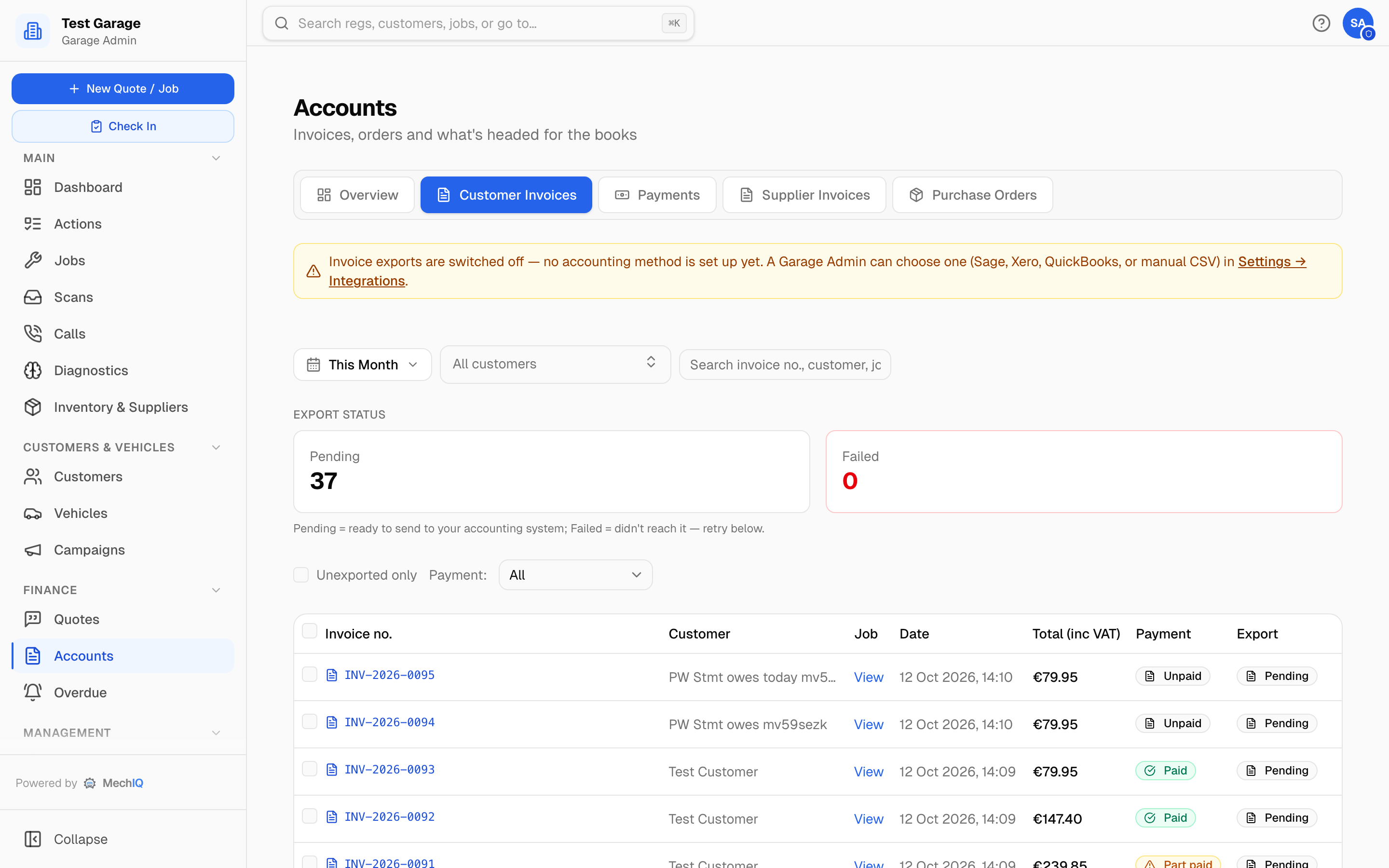
Every invoice and credit note raised. Filter by date (This Month by default), by customer, and by Payment state: All, Outstanding, Overdue, Billed this month, Owed, Part paid, Pay later, On account, Paid, Written off, Credited, Credit notes. The Pending and Failed tiles filter by export state; Unexported only shows what hasn't reached the books.
| Column | What it shows |
|---|---|
| Invoice no. | Click to view the PDF. Credit notes carry a Credit note badge and sit under the invoice they credit. |
| Customer, Job, Date | View opens the job. |
| Total (inc VAT) | |
| Payment | Owed, Part paid, Pay later, On account, Paid, Written off or Credited -- the one status every screen shows (see Invoicing and Checkout). |
| Books | The document's state with your books (one of the five above). |
The ⋯ menu on a row: View invoice (View receipt once it is paid, View credit note on a credit note), Open job, Take payment…, Send statement of what's owed (account customers), and Raise credit note. See Taking a payment and Credit notes.
Below the list, Export Errors shows what didn't reach your books. Export History is on the Export tab.
Payments
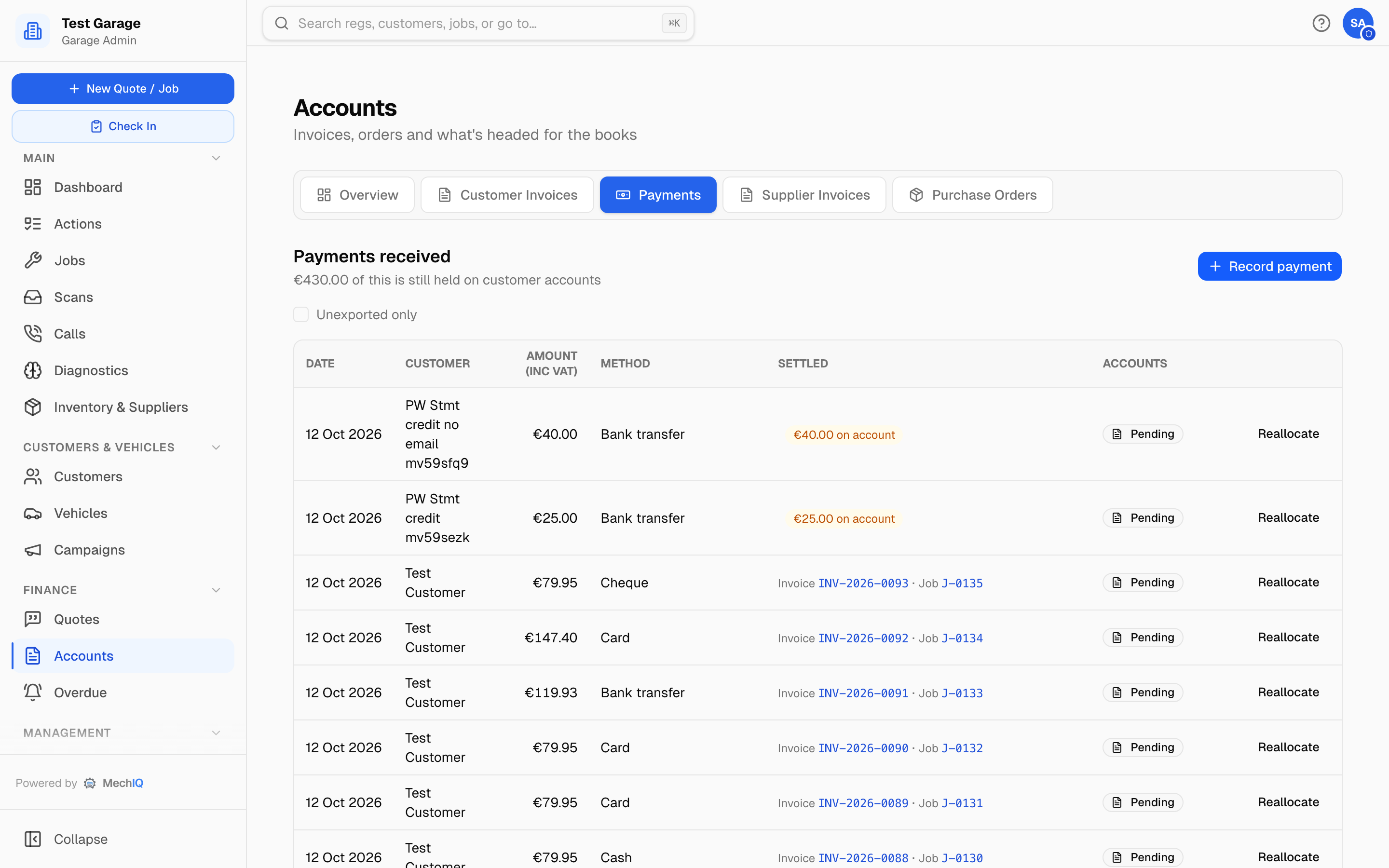
Every payment received, newest first: Date, Customer, Amount, Method (with the cheque or bank reference), Settled and Accounts. Settled names each item the payment was applied to (Invoice …, Credit note …, and the job behind it), with the amount for each when there are several. Books shows the payment's state with your books (In your books, Not in your books yet, Didn't reach your books with the reason on hover), or Not applicable with why -- no money moved (credit applied to an invoice) or brought forward (credit brought across from your old system by an import, already in your books from there). Unexported only narrows the list to what the next export will include. Money not yet applied to an invoice shows as €X on account. The subtitle tells you how much is still held on customer accounts.
- Take payment -- pick the customer, then enter the date, amount, method and reference, and tick what it covers. The methods are the garage's one list (Settings -> Payments). Anything left over sits on the customer's account.
- Reallocate -- change which invoices a payment settles.
The desk flow is in Taking a payment; deposits are in Deposits.
Supplier invoices
Every supplier bill and credit note, what's due when, which account it's coded to, and its state with your books. Add supplier invoice records a bill -- read from a file or typed in by hand. See Supplier invoices.
Purchase orders
The record of every order sent to a supplier. It is read only: order parts from the job's Order parts box or the Order basket, and receive deliveries in Inventory → On order. See Purchase orders and receiving.
Where the rest lives
- Aged balances and statements: Customers → Outstanding Balances, with Send statements… to email everyone who owes you. At the start of each month the Actions list has one action, Send statements — N account customers owe, that opens this run. Nothing is sent automatically. See Customer statements.
- Customers in credit (payments not yet applied, credit notes beyond what they owe): Customers → Customer credit. See Customers.
- Chasing: Finance → Overdue. See Overdue.
- What you owe one supplier: their statement on Inventory & Suppliers → Suppliers. See Suppliers.
- Proof that your accounting package holds exactly what MechIQ invoiced, document by document: the Books check tab. See Books check.
- Codes, formats and the accounting method: Accounting settings.